
What-If Analysis for Traders: Test a Rule Before You Trust It
Product research based on TDLab workflows, hands-on testing and cited source material.
A trading what-if analysis applies one explicit decision rule to a fixed set of closed trades and compares the historical result before and after that rule. It can answer questions such as: what if I had stopped after two losses, waited 30 minutes after a loss or limited the session to four trades?
The result is not a forecast. It is evidence about which historical decisions the rule would have changed, what those changes did to the sample and whether the rule deserves a forward test.
The useful sequence
Fix the baseline, state one rule, run the simulation, inspect the affected trades, challenge the result on another period and only then decide whether to test the rule and add it to your Account Rules.What trading what-if analysis is not
The phrase is used for several different activities. Separate them before choosing a tool or interpreting a result.
- Market replay recreates historical price action so you can practise entries and exits.
- Strategy backtesting applies entry, exit and risk logic to historical market data.
- Monte Carlo analysis resamples or rearranges outcomes to explore a range of possible paths.
- Behavioral rule simulation keeps your recorded trades as the baseline and changes one decision constraint.
TDLab's Rule Simulator belongs to the fourth category. It does not invent trades that were never taken or prove that a different strategy would work. It asks what would have happened to the recorded sample if a selected rule had been respected.
If you are choosing a journal partly for simulation, compare the underlying jobs rather than the word itself. Our sourced TDLab and TraderSync comparison covers AI what-if analysis and market replay, while the TDLab and TradesViz comparison covers multi-asset replay, backtesting and risk simulators.
1. Freeze the baseline before testing a rule
A comparison is only useful when the before state is stable. Record the account, date range, timezone, symbol filter and whether fees are included. Confirm that missing or duplicated trades are resolved and that the reviewed fields needed by the rule are complete.
Keep these values beside every result:
- number of eligible closed trades;
- review coverage for plan, setup and discipline fields;
- net P&L, expectancy, profit factor and maximum drawdown;
- average trades per day and loss-streak context;
- the exact rule parameters and simulation date.
If the baseline changes between runs, you may be comparing two data selections rather than two rules.
2. Write the rule as a falsifiable hypothesis
Start from an observed process problem, not a rule that merely sounds disciplined. Use a sentence with a trigger, an action and a reason to reject it.
For example: "After a losing trade, exclude entries made during the next 30 minutes. Keep the rule only if it reduces drawdown without removing most qualified setups across more than one period."
Other testable questions include:
- What if I stopped after two losses in one day?
- What if I took no more than four trades per session?
- What if I reduced size on the next two trades after a loss?
- What if I excluded one weak weekday and time block?
- What if I kept only trades marked as followed plan?
The observation should come first. The post-loss behavior guide and the overtrading audit show how to find candidate rules without guessing.
3. Test one decision rule at a time
A single-rule run makes attribution possible. If a cooldown, trade cap and weekday exclusion all run together, an improved result does not tell you which constraint helped or whether one rule concealed the damage from another.
Multi-rule simulations are useful later, when each component has a reason to exist. First establish the marginal effect of each rule; then test whether the sequence still makes operational sense.
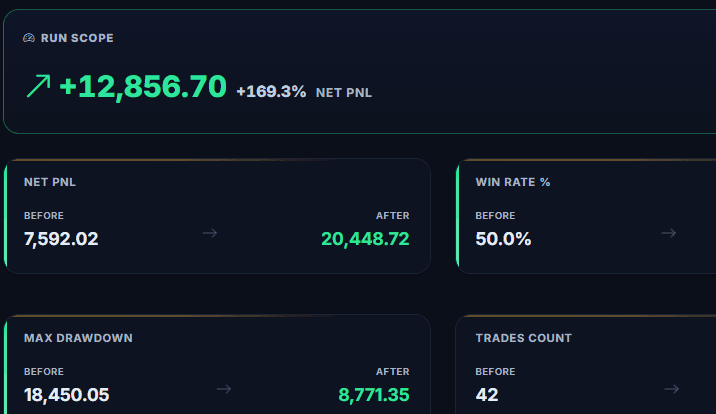
4. Read the trade changes behind the headline result
A larger simulated net profit can be created by one avoided outlier. A lower drawdown can come at the cost of removing many valid trades. Open the affected-trade list and answer four questions.
- How many trades changed? Report the count and share of the baseline, not only the money difference.
- Why did each trade qualify? Confirm that timestamps, loss sequences, setup labels and reviews support the rule.
- What did the rule remove? Separate poor decisions, valid losses and valid winners.
- Is the result concentrated? Check whether one day, instrument or extreme trade explains most of the improvement.
Compare multiple metrics together. Net P&L without drawdown and trade count hides the cost of the rule. Win rate without expectancy hides the size of wins and losses. The trading performance scorecard explains the minimum context each result needs.
5. Challenge the result before trusting it
The more alternatives you try, the easier it becomes to find one that looks excellent by chance. Bailey and co-authors describe this selection problem in their research on the probability of backtest overfitting. A behavioral simulation is narrower than a full strategy backtest, but choosing the best result from many rules creates the same basic risk.
Use simple robustness checks:
- test the same rule on an adjacent period;
- keep a recent period untouched as a holdout;
- check nearby parameters, such as 20, 30 and 40 minutes;
- record every rule tried, including the weak results;
- reject a rule that depends on one trade or unclear data;
- prefer a rule you can actually follow and evaluate live.
Nearby parameters do not need identical results, but a sensible rule should not collapse because the threshold moves by a few minutes or one trade.
Historical improvement is not proof
A what-if result shows how a recorded sample changes under a rule. It does not show how market conditions, trader decisions or missed opportunities will change in the future.6. Turn the survivor into a forward rule
After the rule survives inspection, translate it into an if-then instruction: "If I close a losing trade, then I will wait 30 minutes and requalify the next setup before entering." Research on implementation intentions supports the usefulness of linking a specific cue to a specific response, although a written rule still has to be practised and measured.
Promote one rule to the TDLab Account Rules, evaluate each applicable trade as respected, violated or not applicable, and review the result after a predefined sample. The rule-adherence guide keeps missing reviews outside the compliance denominator.
For the complete product workflow and available rule families, see the TDLab Rule Simulator documentation.
A compact what-if analysis checklist
- Freeze account, date range, filters, timezone and fees.
- Confirm the relevant trade and review data is complete.
- Write one trigger, action and rejection condition.
- Run one rule and save its exact parameters.
- Inspect every excluded or adjusted trade.
- Compare outcome, risk, trade count and process quality.
- Challenge the result on another period or holdout sample.
- Forward-test one rule and measure adherence.
Common questions
How many trades do I need for a what-if analysis?
There is no universal number. Report the total sample and the number of trades the rule changes. A result based on three affected trades needs much more caution than one repeated across many independent sessions.
Should I choose the rule with the highest simulated profit?
No. Prefer a rule tied to an observed process problem, supported by more than one period and realistic enough to execute. Consider drawdown, valid opportunities removed and adherence, not just profit.
Can I combine several rules?
Yes, after testing each rule separately. A combined run is useful for checking interaction and order, but it should not hide which rule is responsible for the result.
Connect behavior, context and performance.
TDLab connects your real trades with behavior, rules and historical market context, then helps you test what to change. Start free for 14 days.