
Tracking strategies, versions and monitors
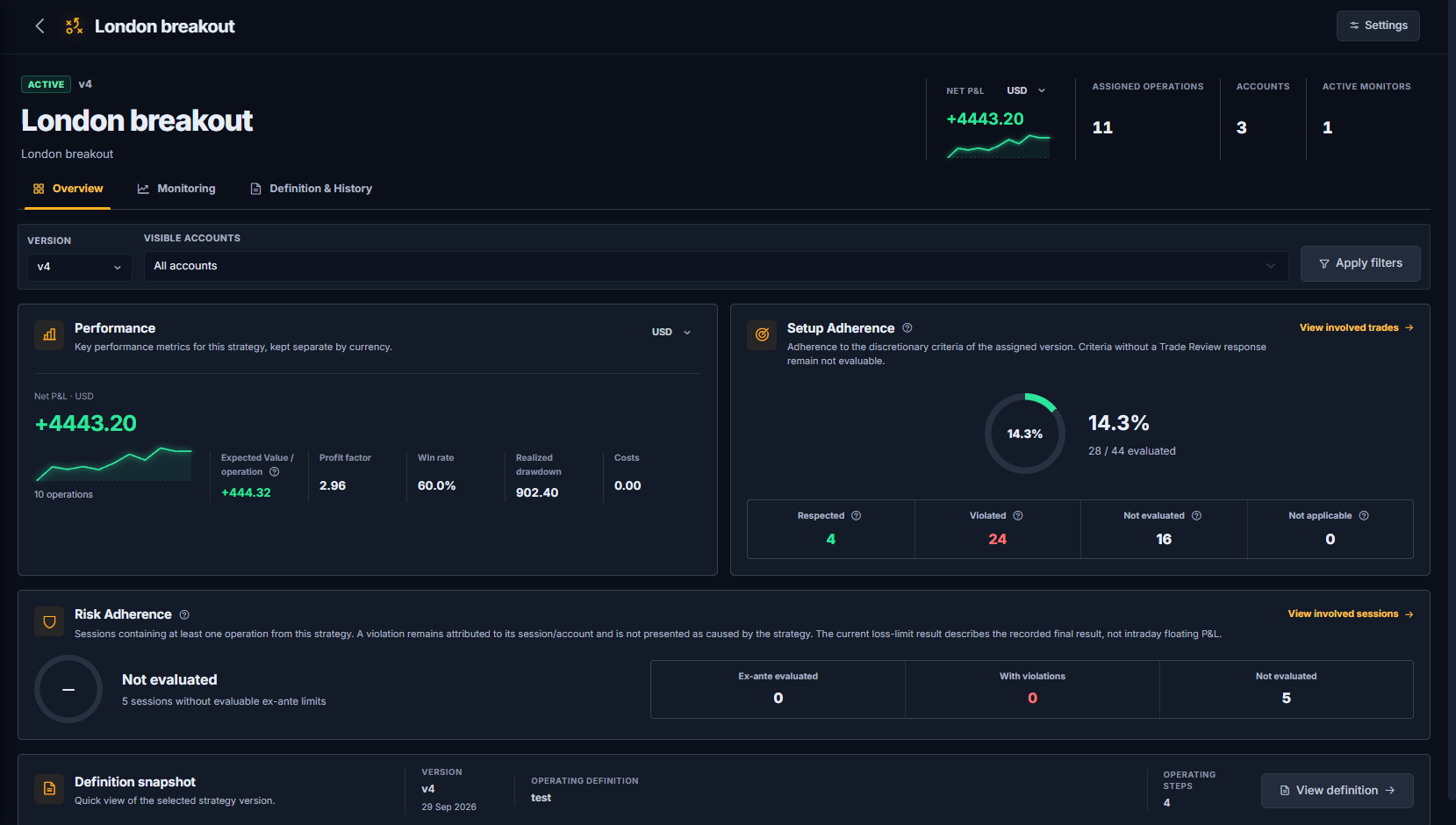
Strategies is where you describe how you trade and check how each way of trading is actually performing. A strategy is an operating model: a name, a written definition and the steps you follow before taking a trade. Trades are assigned to the strategy version you really used, so results, adherence and risk are always read against the right model.
Strategies belong to you, not to a single trading account. The same strategy can be executed on several accounts, and each account keeps its own Account Rules.
The core principle
History is never rewritten. A material change to a strategy creates a new version; trades already assigned stay linked to the version that was in use when they were taken.Create a strategy
Open Strategies in the sidebar and choose New strategy. Enter:
- Name and an optional description.
- Operating definition: what the model is, in your own words (context, entry, management, exit).
- Operating steps: one step per line, for example “Confirm higher-timeframe context before entry”. These steps become the checklist you answer in Trade Review.
Saving creates the strategy together with version 1. A strategy can be Draft, Active, Paused or Archived.
Versions
Published versions are immutable. To change the definition or its steps, create a new version from the Definition & History tab and record the reason for the change. The version history lists every published version in chronological order.
- Active / inactive: only active versions are offered for new assignments in Trade Review. Deactivating a version never changes trades already assigned to it.
- Current: the published version used by default for monitoring and new attribution.
- Best version: an optional marker for the version you consider your best reference. It sets which version the strategy preview highlights and does not affect assignments.
- A version can be deleted only if it is the latest one, has never been used and at least one other version exists.
Assign trades
The routine place to assign a trade is Trade Review: select the strategy and the version actually used, then mark which operating steps you followed. Only active versions appear in the selector.
For trades imported before you created the strategy, use Assign historical trades on the strategy page. Pick the operations and the version you used, and assign them in bulk. A retrospective assignment is recorded as such and is not treated as a pre-trade declaration. You can move any operation back to Unassigned; every assignment change is kept in an audit history.
Overview: performance
The Overview tab shows the key metrics for the selected version and visible accounts:
- Net P&L, with a cumulative sparkline.
- Expected Value per operation: EV = (win rate × average win) − (loss rate × average loss). Break-even operations contribute zero, and the estimate becomes more reliable as the sample grows.
- Profit factor, win rate, realized drawdown and costs.
Results are kept separate by currency: choose the results currency to see accounts in that currency. Operation and account counts always include every currency. Filter by version (or all versions) and by visible accounts.
Setup Adherence
Setup Adherence measures how often the operating steps of the assigned version were followed, using your answers in Trade Review. Each step on each operation is one of:
- Respected: marked as followed in Trade Review.
- Violated: marked as not followed.
- Not evaluated: the trade uses this version but the step has no answer yet.
- Not applicable: the step was explicitly excluded for that operation.
The percentage uses only respected and violated rows. Open View involved trades to see every assessment and jump to the trade in Trade Review.
Self-reported, by design
Operating steps are discretionary criteria, so their adherence comes from your own answers. TDLab keeps it separate from checks it calculates from execution data.Risk Adherence
Risk Adherence looks at the trading sessions that contain at least one operation from this strategy and checks the limits you declared for those sessions, such as maximum trades and maximum loss. Only limits declared before the session started count as ex-ante.
Limits and results refer to the whole account session, not only to the trades of this strategy. A violation stays attributed to its session and account; it is not presented as caused by the strategy. Sessions without declared limits appear as not evaluated.
Monitoring: follow a version over time
A monitor answers the question “is this version still behaving like it did?”. In the Monitoring tab, choose Create monitor: TDLab freezes the version, the selected accounts, the sample of trades and its metrics as the baseline.
- Baseline (frozen): an immutable snapshot of the trades and metrics available when the monitor was created. Late imports and reassignments never change it; if the current history no longer matches, TDLab tells you and keeps the original reference.
- Since baseline (live): results of new trades assigned to the monitored version after the monitor was created. They update automatically after each import or sync.
- Integrity & coverage: included accounts, tracked version, coverage period and any check that may make the comparison incomplete.
When you assess the strategy, record a review: choose a decision (Continue, Investigate, Pause or Create new version) and add a note. Each review keeps a snapshot of the metrics visible at that moment, so the review history shows what you knew when you decided. Recording a review does not pause the monitor or create versions automatically. Close the monitor when you no longer need it.
Archive or delete
A strategy can be deleted only while it contains no operational or historical data. Once trades, reviews or monitors exist, archive it instead: it leaves the operational flows without losing any data.
Reading the results
- Small samples move a lot. Read Expected Value, profit factor and adherence together with the number of operations.
- A baseline is a historical reference: comparing new trades to it describes what happened, it does not certify that an edge will continue.
- To test a change before adopting it, use the Rule Simulator on the same trades; to find recurring behavioral patterns, see Discipline OS.
Put the evidence to work.
Connect your real trades with behavior, rules and historical market context. Start free for 14 days.